
|
Management setting ·
This setting is only applicable for locations with Uber Ride integration with Uber for Business. Contact your TSD Sales Representative at sales@tsdweb.com for more information.
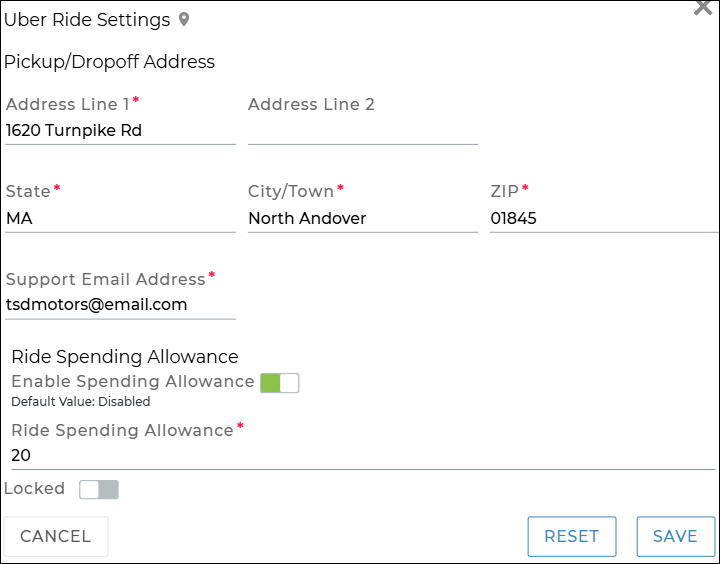
If you use Uber Ride Integration to provide rides to customers, use this setting to manage your location's pickup/dropoff address, email, and, if you choose, limit ride availability by price and offer rides between two off-site locations.
- Pickup/Dropoff Address: The address of the location to be used for all new ride requests, going forward. By default, this is the location's address, but can be changed.
- Support Email Address: Enter a single email address (an individual or group email) to be CC’d when rider support requests are sent to Uber for Business.
- (Optional.) Ride Spending Allowance, to limit ride availability by price: Toggle on Enable Spending Allowance, then enter a Ride Spending Allowance amount that determines which rides will be available when booking; no rides above the spending allowance will be shown. For example, if your allowance is $75.50, options that cost more than this will not be shown when booking rides.
- (Optional.) Allow Off-Site Addresses: Toggle on Allow Off-Site Address at Pick-Up and Drop-Off to offer rides between two off-site locations, such as from a customer’s home to their workplace or body shop. When turned off, rides are only allowed to or from the dealership.
Hover to view the full-sized image.
© 2026 TSD Rental, LLC